
You hired an ace on Monday. Smart, fast, willing. What do they need to actually be useful? You’d tell them what the business does and who your customers are. You’d forward them a few emails you’d sent recently, so they could draft in your voice. They’d see your current projects, your client list, the patterns you actually cared about. None of that would feel optional. It’s just how onboarding works.
You should think about AI the same way. Most owners I work with don’t. They open ChatGPT, Claude, maybe Copilot, paste a question, get a result, close the tab. Tomorrow, they start over. Some of them tell me “I tried ChatGPT but gave up.” Some say “I know I should be using AI but I don’t know where to start.” Most say a version of “I’m paying for it and using it for one thing a week.”
Most owners don’t have an AI problem. They have an onboarding problem.
What follows is the playbook I take every Solo client through before we build anything custom. The moves to push your chat-box use further than you thought possible, the habits I’d layer on top, and the structural shift when chat stops being the right surface. Most of it is things you can apply this week.
Get the input right
The single biggest move for casual users is also the cheapest one. Stop describing your situation. Paste the actual thing.
Most people type three lines describing an email thread, get a generic template back, and conclude AI is shallow. Paste the actual email thread. Paste the actual document. Paste the actual customer complaint. The output goes from generic to something you’d actually send. You wouldn’t tell a new hire “write a response to a difficult client” without showing them the email. Same rule.
Then beat the question into shape. “What are some marketing ideas for my business” produces sludge. “I run a six-truck residential HVAC company, my biggest pain is that 30 percent of my maintenance plan members aren’t renewing in year two, give me three retention email scripts that don’t feel like upsell pressure” produces something you can run on Monday. Specificity isn’t a stylistic choice. It’s the difference between an answer and a script.
The practitioner-grade move I’d add: tell it what you’ve already tried. Most people walk into the conversation as if it’s the first time anyone has ever thought about the problem. Two minutes spent on “here’s what I’ve already tested, here’s why each one didn’t land” cuts iteration cycles roughly in half. Calibration upstream beats refinement downstream. Almost nobody does this, and it’s the cheapest skill increase available.
Stop reinventing the conversation
If you reintroduced yourself to your team every Monday morning, they’d quit. The chat box does this every conversation. The tool has no memory of who you are, what you sell, or how you write. You retype the same context every time, get a slightly different answer every time, and chalk it up to AI being inconsistent.
Save the context once. Custom GPT. Claude Project. A saved system prompt. Pick the surface and write the employee handbook you don’t want to retype. “I run [Business X], my role is Y, my customers are Z, here’s how I write. When I ask for emails, default to short and direct. When I ask for analysis, default to skeptical.” Pin it. Reuse it. The gap between AI that knows your world and AI guessing from training data is whether you bothered to write the handbook.
Voice is the other side of context. “Write in my voice, casual but professional” almost never works. Pasting five examples of your actual writing and saying “match this register” almost always works. You wouldn’t tell a new hire “sound like me.” You’d forward them five emails you’d actually sent. Same rule.
Then save the prompts that worked. When an output hits, save the prompt that produced it. Six months of saving working prompts and you have a real toolkit, not a fresh chat every time. The toolkit compounds quietly. The fresh-chat habit doesn’t.
The practitioner-grade move I’d add: save the bad outputs too. Most people only file the wins. The misses are where the lessons hide. The output that almost-worked teaches you what was missing in the prompt. The output that misread the situation tells you what context you forgot to load. An anti-pattern library is what lets you, two weeks later, articulate “do this, not that” instead of re-explaining from scratch.
Use it as a thinking tool, not an output machine
Most people ask AI for an answer. The real move is asking for a critique of your answer.
“What am I missing?” “What would the opposite case look like?” “Steelman the argument I’m not making.” Most casual users have never pointed AI at their own decisions. They use it as a vending machine. Insert prompt, retrieve snack, judge AI on whether the snack was good. You hired a genius. Genius is wasted on snacks.
Same problem on drafting. Most people ask AI to write the first draft and end up rewriting it anyway because the voice is wrong and the structure is generic. Flip the order. Write a bad first draft yourself. Paste it: “What’s weak here? Where would a skeptical reader push back?” You keep control of voice and substance. The AI runs the cognitive review pass. The output is shippable without rewriting.
And iterate. The single line “tighter” produces dramatic results. So does “more specific.” So does “now write it for a skeptical reader” or “cut the hedging.” Most casual users take the first output, judge AI on it, and stop. Two or three iteration passes is where the holy-shit moment actually lives. The first output is the warm-up.
The practitioner-grade move I’d add: don’t ask for opinions, ask for trade-offs. Generic “what do you think?” gets fortune-cookie answers. “What does this trade away?” gets operator-grade analysis. The shift from opinion to trade-off is the shift from advice to thinking partner.
The boring 80%
Most people fail at AI by starting with the strategic 20 percent. The investor letter. The board memo. The high-stakes copy where every word is second-guessed. They get a draft that doesn’t quite land, decide AI “isn’t quite there,” and stop using it.
That’s like firing a new hire for not nailing their first board memo. Wrong calibration of where to test their judgment. The real wins come from the recurring drudgery first. Meeting notes. Inbox triage. Data cleanup. Standard email replies. The work where the bar is functional, not exquisite, and where the volume eats your hours every week. Build trust on low stakes. Move up from there.
The companion move: layer AI into your existing workflow. Don’t redesign the workflow around AI. If you already write meeting notes, then summarize them, then send a follow-up, keep that workflow and have AI run the summarize step. Most casual users try to redesign their whole process around AI and stall on integration. Fastest adoption is the lowest-friction one.
The practitioner-grade move I’d add: treat workflows as the unit, not prompts. Most casual users optimize prompts. Power users optimize workflows. The difference matters because a great prompt that runs once a month is worth less than a mediocre prompt that runs reliably twice a week. The unit you’re improving isn’t the sentence you typed. It’s the loop the sentence sits inside.
When you outgrow the chat box
Everything in this post so far has been about getting more out of the chat box. This last move is about outgrowing it.
Past a certain point, the structural moves matter more than the prompts. Persistent context across sessions, not retyped every Monday. Reusable skills and AI workflows, your library of prompts-that-worked but as actual tools you invoke by name. Integrations that connect to your real stack instead of paste-and-pray. The chat box is your new hire’s notepad. The upgrade is giving them real tools.
The category is AI workspace, not AI chat. Cowork is what my Solo clients use day to day. Claude Code is the developer-side equivalent. Same act, much more lift. The shift is the same one a writer makes from a notepad to a writing app. The work is unchanged. The infrastructure underneath finally matches what the work actually needs.
Past the upgrade
Past the upgrade, the work compounds in ways that are hard to see until you’re a year in. Three things separate a long-time power user from someone who just installed the workspace.
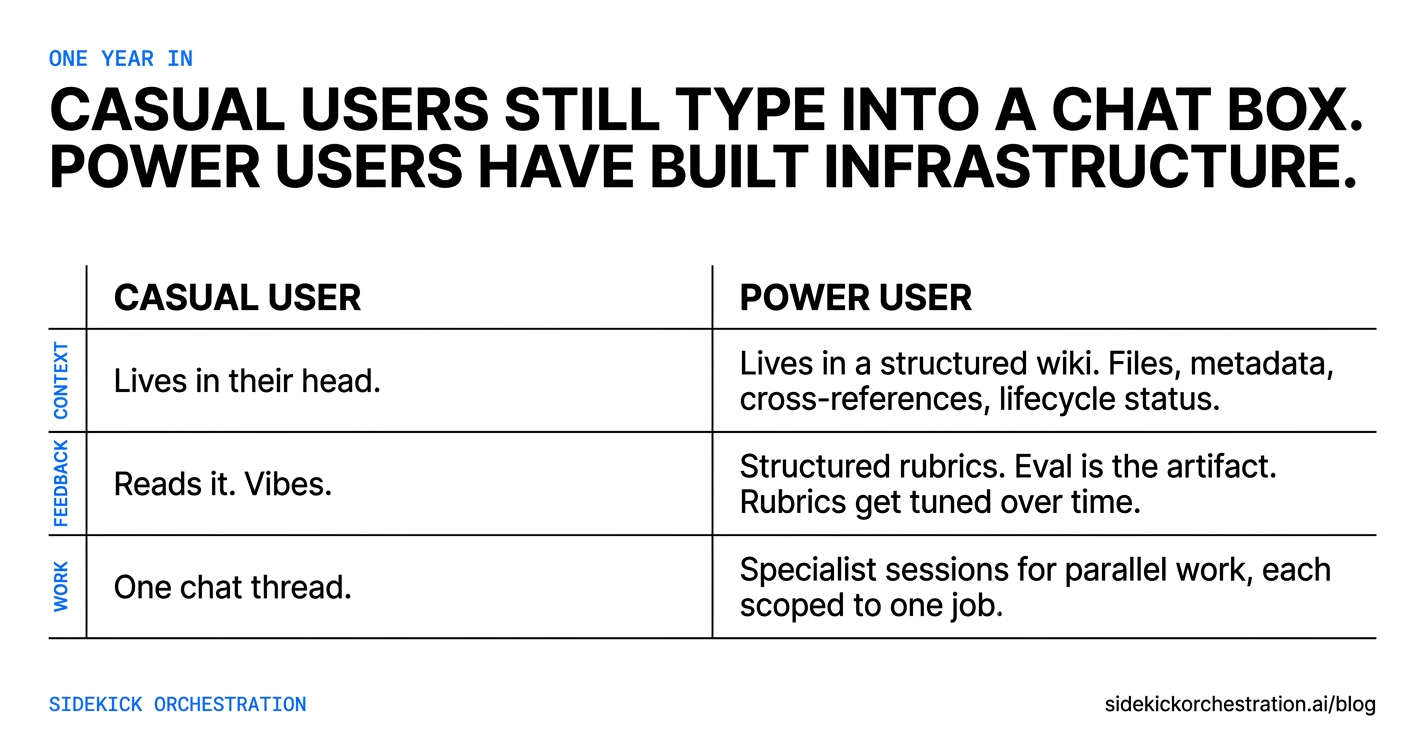
Context becomes a wiki, not a prompt. A casual user’s context lives in their head. A power user’s context lives in a structured library: files for each client, each project, each policy, each segment of their business. Each file has metadata, cross-references to related files, and a status. The AI navigates this library the way you would: it follows the links, checks if a file is canonical or stale, surfaces the right context for the question. Most casual users build this accidentally, in a Notion or a Drive folder, and never get the AI to use it. The discipline of treating your context like a wiki is what makes the AI fluent in your business instead of guessing.
Feedback loops become explicit, not vibes. A casual user judges AI output by reading it and going “that’s good” or “that’s bad.” A power user runs structured assessments: a hook gets scored on a rubric before it ships, a draft passes through perspective-based reviews, a workflow gets re-run after each failure with the failure logged. The eval is the artifact. Over time, the rubrics themselves get tuned. The AI gets sharper because the assessments get sharper.
Work fans out to specialists, not stays in one chat. A casual user runs every task through one chat thread. A power user spawns specialist sessions for parallel work: one for research, one for drafting, one for file audits, one for code edits. Each session has a tight scope, the right tools, and a focused brief. This is how a small business runs at the throughput of a much larger one without adding headcount.
By a year in, casual users still type into a chat box. Power users have built infrastructure.
Reading the playbook and shipping none of it is where most owners actually live. This post is more advice you still have to act on yourself.
Doing all of this yourself is the long road. Sidekick Solo is the same destination, configured around your work in a week. The clients who come to me usually start with “I just want someone to set it up for me.” If that sounds easier than building it yourself, the conversation starts with a call.